Home
Home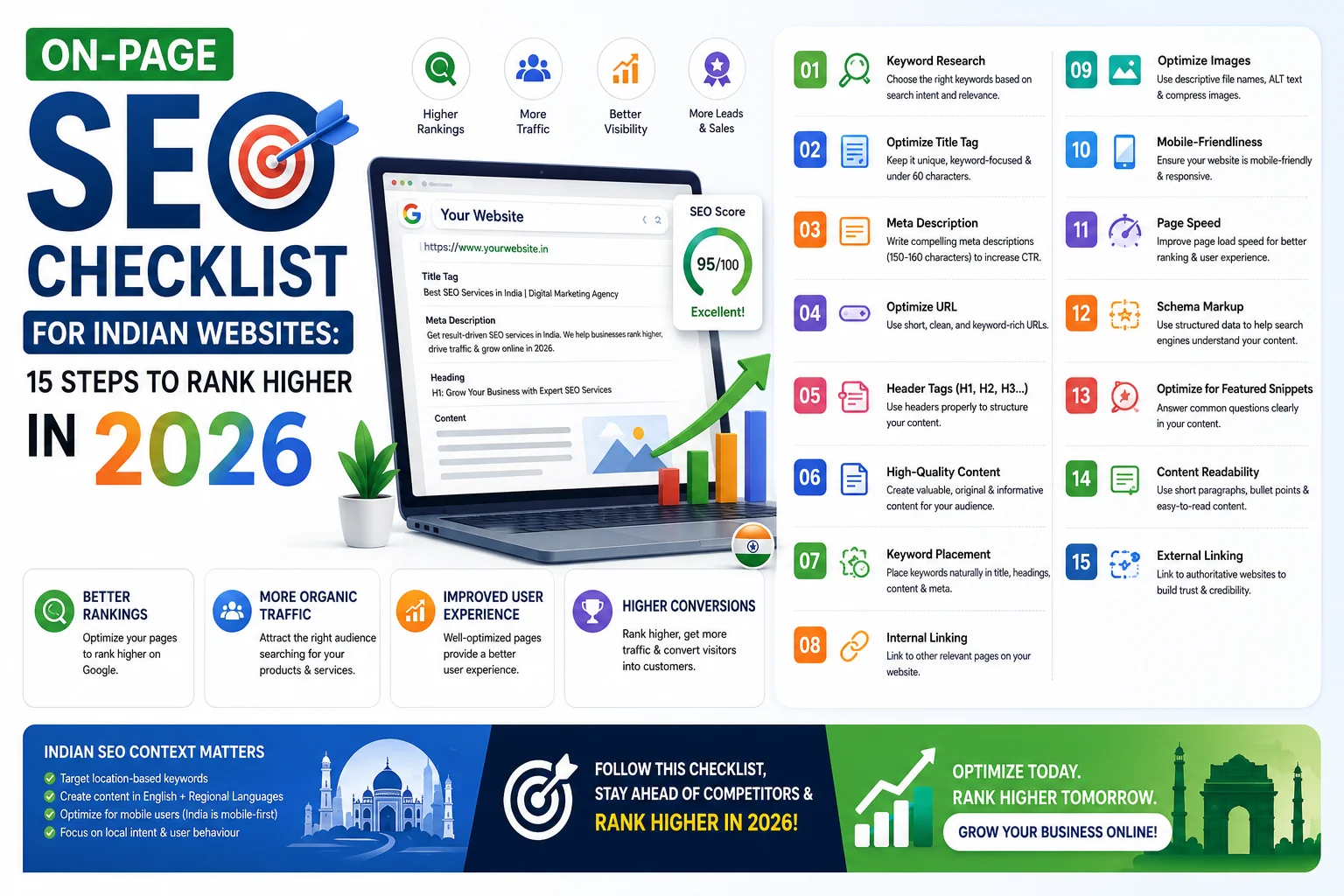
Most Indian businesses invest in website design and completely ignore on-page SEO. That is why their competitors appear on Page 1 while they remain invisible.
In this complete guide, you will get the exact 15-step on-page SEO checklist
that we use on every website we build and optimize.
Follow these steps and give your website a powerful foundation to rank higher on Google in 2026.
What is On-Page SEO?
On-page SEO refers to all the optimizations you make directly on your website
to help search engines understand your content and rank it higher in search results.
Unlike off-page SEO — which involves backlinks from other websites — on-page SEO is entirely within your control.
- Optimizing your title tags and meta descriptions
- Using the right keywords in the right places
- Structuring your content with proper headings
- Improving page speed and mobile experience
- Adding schema markup for rich results
On-page SEO is the foundation. Without it, even the best backlink strategy will not deliver consistent results.
On-Page SEO vs Off-Page SEO
Many Indian businesses confuse these two and focus on the wrong one first.
- On-Page SEO: What you do on your own website — content, keywords, speed, structure, schema
- Off-Page SEO: What happens outside your website — backlinks, social signals, citations, GBP reviews
- Technical SEO: The backend health of your site — crawlability, sitemap, robots.txt, HTTPS
On-page SEO should always be completed first.
Getting backlinks to a poorly optimized page is like advertising a shop with a broken front door.
The Complete On-Page SEO Checklist: 15 Steps
1. Keyword Research — Find What Your Audience Searches
Every page on your website should target one specific keyword that your potential customers search for.
Without keyword research, you are guessing — and guessing wastes time and traffic.
- Use Google Search’s autocomplete to find real search queries
- Check “People Also Ask” and “Related Searches” on Google for LSI keywords
- Use free tools — Google Keyword Planner, Ubersuggest, or Keywords Everywhere
- Target long-tail keywords — “web designer in Surat for small business” instead of just “web designer”
- Check keyword difficulty — new websites should target low to medium competition keywords first
2. Optimize Your Title Tag
The title tag is the blue clickable text in Google search results.
It is one of the strongest on-page SEO signals and directly affects your click-through rate.
- Keep title under 60 characters — Google cuts off longer titles
- Place your primary keyword at the beginning of the title
- Include your city name for local businesses — “Web Designer in Surat”
- Make it compelling — it is also an advertisement that competes for clicks
- Every page must have a unique title — no duplicates
3. Write a Strong Meta Description
The meta description is the grey text below the title in Google results.
It does not directly affect rankings but massively affects whether someone clicks your result or a competitor’s.
- Keep under 160 characters
- Include your primary keyword naturally — Google bolds it in results
- Include a clear benefit or call to action — “Get a free quote today”
- Every page needs a unique meta description
- Use Rank Math or Yoast to set meta descriptions in WordPress
4. Optimize Your URL Structure
Clean, keyword-rich URLs help Google understand your page topic at a glance.
- Keep URLs short and descriptive — yoursite.com/web-designer-surat/ not yoursite.com/page?id=234
- Use hyphens to separate words — not underscores
- Include your primary keyword in the URL
- Avoid dates in blog post URLs — they become outdated
- Use lowercase letters only in all URLs
5. Use Proper H1, H2, H3 Heading Structure
Headings help both users and search engines understand the structure and hierarchy of your content.
A correct heading structure is one of the most overlooked on-page SEO factors in India.
- Every page has exactly one H1 tag — it should include your primary keyword
- Use H2 for main sections of your content
- Use H3 for subsections within each H2
- Never skip heading levels — do not go from H1 directly to H4
- Include relevant keywords naturally in H2 and H3 headings
6. Use Your Keyword in the First 100 Words
Google pays special attention to the opening paragraph of your page.
Using your primary keyword early signals to Google what the page is about from the very beginning.
- Mention your primary keyword within the first 100 words naturally
- Do not force it — write naturally for readers first
- Also use related keywords and synonyms throughout the content
- Keyword density should be 1 to 2% — not more
7. Write High-Quality, Detailed Content
Content is still the most important ranking factor in 2026.
Google’s goal is to show users the best, most helpful answer to their search query.
Thin, shallow content cannot compete with comprehensive, detailed pages.
- Blog posts should be 1,200 words minimum — 1,500 to 2,500 for competitive keywords
- Answer every question a user might have about the topic
- Use bullet points, tables, and subheadings for easy reading
- Include real examples, data, and India-specific context
- Write in simple English — your audience includes non-native English speakers
8. Optimize All Images
Images improve content quality but can severely damage page speed if not optimized.
They also have their own SEO signals that many Indian websites completely ignore.
- Add descriptive ALT text to every image — include keyword where relevant
- Use descriptive file names — web-designer-surat.jpg not IMG_4523.jpg
- Compress all images to WebP format before uploading
- Enable lazy loading — images load only when the user scrolls to them
- Set correct image dimensions — do not upload a 4000px image for a 600px space
9. Build Strong Internal Links
Internal links connect your pages to each other and help Google discover all your content.
They also distribute “link authority” across your website, helping lower-ranking pages improve.
- Link every new blog post to at least 2 to 3 other relevant pages on your site
- Link blog posts to your Services page and Contact page
- Use descriptive anchor text — “WordPress development services” not “click here”
- Link from high-traffic pages to pages you want to rank higher
- Check for orphaned pages — every page should have at least one internal link pointing to it
10. Optimize Page Speed
Page speed is a confirmed Google ranking factor — and for Indian users on variable mobile connections,
it directly determines whether visitors stay or leave.
- Target 90+ score on Google PageSpeed Insights (mobile)
- Install WP Rocket or LiteSpeed Cache plugin
- Use a CDN — Cloudflare free plan works well for India
- Use quality hosting — Hostinger Business or Cloudways
- Minimize unused CSS and JavaScript
11. Ensure Full Mobile Optimization
Google uses mobile-first indexing — meaning it ranks your website based on how it performs on mobile.
Over 78% of Indian internet users browse on mobile devices.
- Test your website on multiple phone models — not just iPhone
- Ensure buttons are large enough to tap without zooming
- Text must be readable without horizontal scrolling
- Forms must work correctly on mobile keyboards
- Check mobile version in Google Search Console for usability errors
12. Add Schema Markup
Schema markup is structured code that tells Google exactly what type of content your page contains.
It enables rich results — star ratings, FAQs, business hours, prices — directly in Google search results.
This increases click-through rate significantly.
- LocalBusiness schema — name, address, phone, opening hours for every local business
- Article schema — for all blog posts
- FAQ schema — for pages with FAQ sections — increases visibility with accordion results
- Product schema — for eCommerce product pages with price and availability
- Use Rank Math SEO plugin to add schema without coding
13. Optimize for Featured Snippets
Featured snippets are the boxes that appear at Position 0 — above all other results — in Google.
They get 35% of all clicks for the search query. Ranking in a featured snippet can double your traffic overnight.
- Answer the main question directly in 40 to 60 words in a dedicated paragraph
- Use numbered lists for “how to” content — Google often pulls these as step snippets
- Use tables for comparison content — Google displays these as table snippets
- Use the exact question as a heading (H2 or H3) and answer immediately below
14. Set Up and Use Google Search Console
Google Search Console is a free tool that shows you exactly how Google sees your website.
It is the most important SEO tool for any Indian business — and it is completely free.
- Submit your XML sitemap — helps Google find and index all pages faster
- Monitor for crawl errors and fix them immediately
- Check which keywords bring visitors to your site
- Request indexing for every new page or blog post after publishing
- Monitor Core Web Vitals report for speed issues
15. Regularly Update Existing Content
Google rewards fresh, updated content.
A blog post you wrote in 2023 with outdated statistics will rank lower than a fresh, updated version.
Updating existing content is often faster than writing new posts — and delivers significant ranking improvements.
- Review your top 10 most visited blog posts every 6 months
- Update statistics, prices, and year references
- Add new sections based on current search trends
- Improve thin sections with more detailed information
- Re-submit updated URLs to Google Search Console for faster re-indexing
Best Free On-Page SEO Tools for Indian Websites
- Rank Math SEO: Best WordPress SEO plugin — free version covers everything a small business needs
- Google Search Console: Track rankings, fix errors, submit sitemaps — completely free
- Google PageSpeed Insights: Check your Core Web Vitals score — free
- Google Keyword Planner: Find keywords and search volumes in India — free with Google account
- Ubersuggest: Keyword research and competitor analysis — 3 free searches per day
- Google Analytics 4: Track all website traffic and user behavior — free
Common On-Page SEO Mistakes Indian Businesses Make
- Using the same meta title and description on multiple pages — Google sees this as duplicate content
- Having multiple H1 tags on one page — only one H1 is allowed per page
- Keyword stuffing — repeating keywords unnaturally makes content unreadable and hurts rankings
- Ignoring image ALT text — missing ALT tags means Google cannot understand your images
- Not using internal links — isolating pages means Google and visitors cannot discover them
- Thin content under 500 words — Google does not rank pages that do not provide enough value
- Not setting up Google Search Console — flying completely blind on how Google sees your site
Advanced On-Page SEO Tips for 2026
- Optimize for AI Overviews — Google now shows AI-generated summaries at the top. Structure content with clear, direct answers to get cited in these summaries.
- Use topic clusters — create one comprehensive pillar page and 5 to 10 supporting blog posts around the same topic. This builds topical authority faster.
- Add video content — pages with embedded videos rank significantly higher and increase time-on-page
- Optimize for “People Also Ask” — include questions as H3 headings with concise answers
- Monitor competitors — check what keywords your top competitors rank for and create better content
Conclusion
On-page SEO is not a one-time task — it is an ongoing process of improvement.
But completing this 15-step checklist for every page on your website gives you a powerful foundation
that your competitors who ignore SEO simply cannot match.
Start with the basics — title tags, meta descriptions, keyword placement, and page speed.
Then add schema markup, internal linking, and featured snippet optimization.
Do this consistently and you will see measurable Google ranking improvements within 3 to 6 months.
Call To Action
Want a professional on-page SEO audit of your website?
Get a free SEO audit today and find out exactly which pages need optimization.
Or contact us to discuss a complete SEO strategy for your business.
Frequently Asked Questions
What is on-page SEO and why is it important?
On-page SEO is the process of optimizing elements on your own website — content, titles, headings, speed, and schema —
to help Google understand and rank your pages higher.
It is the foundation of all SEO and must be completed before any off-page or link building strategy.
How long does on-page SEO take to show results?
On-page SEO improvements typically show results within 4 to 12 weeks for low-competition keywords.
For competitive keywords, expect 3 to 6 months of consistent optimization and content publishing
before significant ranking improvements appear.
Can I do on-page SEO myself without hiring a professional?
Yes — with Rank Math SEO plugin and Google Search Console, many on-page SEO tasks can be done yourself.
The checklist in this guide covers everything you need to get started.
For advanced technical SEO and faster results, working with a professional is recommended.
What is the most important on-page SEO factor in 2026?
Content quality and search intent match are the most important factors in 2026.
Your content must directly answer what the user is searching for, be more comprehensive than competing pages,
and be supported by proper technical optimization including speed and mobile-friendliness.
Is Rank Math better than Yoast for on-page SEO in India?
Rank Math is generally considered the better option for Indian WordPress websites in 2026.
The free version of Rank Math includes features that require a paid Yoast subscription,
including schema markup, redirection manager, and 404 monitoring.
How do I check if my on-page SEO is working?
Use Google Search Console to monitor your keyword rankings and click-through rates.
Check your organic traffic in Google Analytics 4 monthly.
Run a PageSpeed Insights test monthly to track your Core Web Vitals score progress.