Home
Home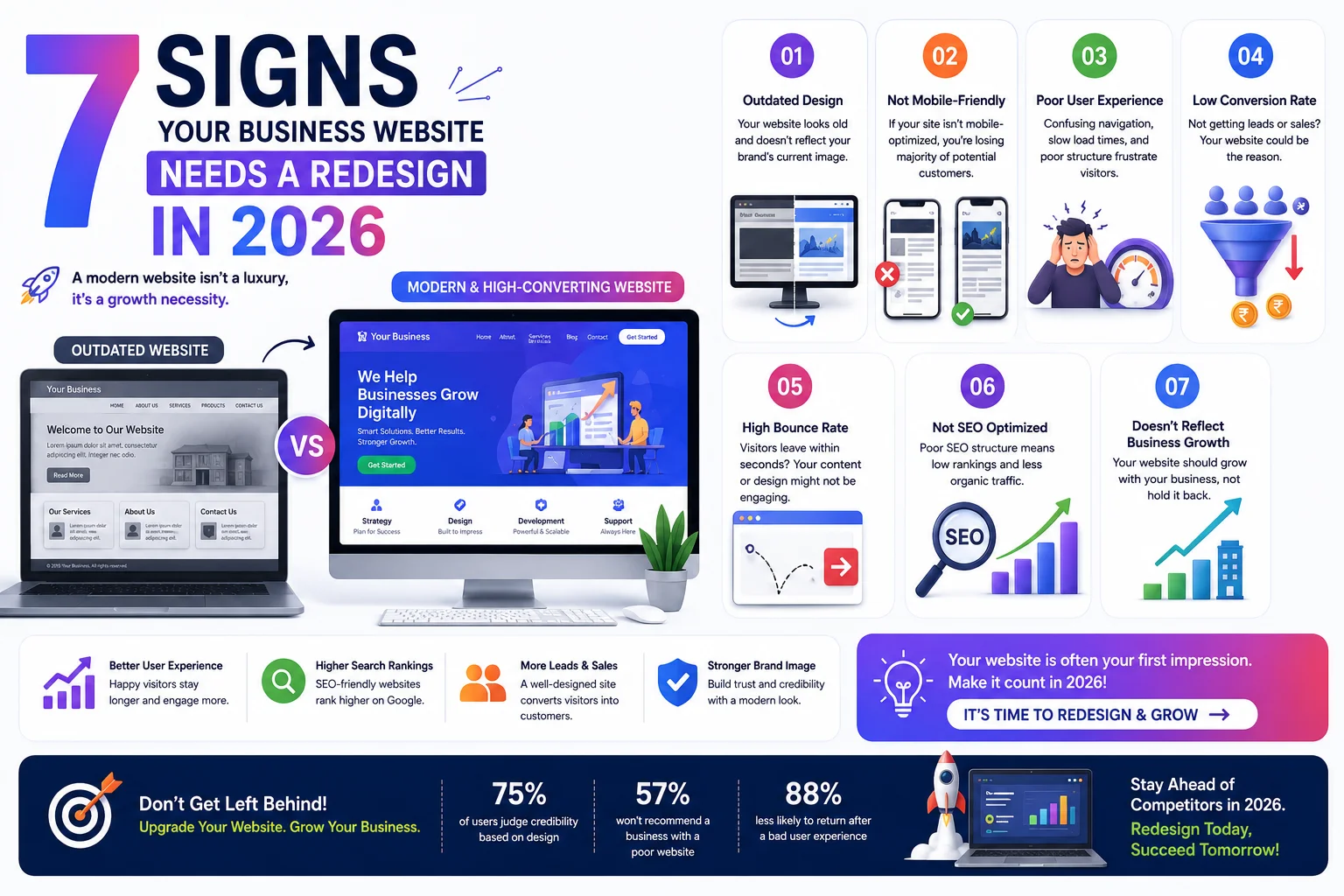
The truth is: an outdated website does not just look bad — it actively costs you customers every single day.
In this guide, you will learn the 7 clear signs that your Indian business website needs a professional redesign in 2026,
along with the cost, timeline, and what to expect from the process.
What is a Website Redesign?
A website redesign is a comprehensive process of rebuilding or significantly updating your existing website —
improving its design, structure, content, speed, and SEO performance.
It is not just changing colors or adding a banner. It is a strategic overhaul that makes your website
work harder for your business.
- Redesign: Complete rebuild of design, layout, and structure
- Refresh: Minor visual updates — colors, fonts, images
- Revamp: Combination — new design with existing content restructured
Most Indian business websites need a proper redesign every 3 to 5 years
as design trends, technology, and Google’s ranking requirements evolve.
7 Signs Your Website Needs a Redesign
1. Your Website Looks Outdated Compared to Competitors
Open your website and three competitor websites side by side.
If yours looks like it was built 5 years ago compared to theirs — your customers notice too.
In 2026, first impressions happen in 0.05 seconds.
An outdated design signals that your business may also be outdated.
- Flat, old-style design with no modern UI elements
- Dated color schemes or fonts that feel out of place
- No animations, transitions, or interactive elements
- Logo and branding look inconsistent across pages
- Competitors have cleaner, more professional-looking websites
2. Your Website is Not Mobile-Friendly
Over 78% of Indian internet users browse on mobile devices in 2026.
Google uses mobile-first indexing — meaning it ranks your website based on the mobile version, not desktop.
If your website breaks, overflows, or looks poor on a smartphone — it is a critical problem.
- Users have to pinch and zoom to read content on mobile
- Buttons are too small to tap without accidentally hitting the wrong one
- The layout breaks on screens smaller than a laptop
- Google Search Console shows “Mobile Usability” errors for your pages
- Your website was built before 2018 — mobile-first design was not standard then
3. Your Page Speed Score is Below 70
A slow website loses visitors before they even see your content.
53% of mobile users leave a website that takes more than 3 seconds to load.
For Indian users on variable 4G connections — speed is even more critical.
- Check your score at pagespeed.web.dev
- A score below 70 on mobile means your site is actively hurting your Google rankings
- Old websites often have too many unoptimized images, bloated themes, and deprecated code
- Sometimes a full redesign on a modern, lightweight theme is faster than fixing an old one
4. Your Website is Not Generating Any Leads or Inquiries
The purpose of a business website is to generate leads.
If visitors are landing on your site but not calling, not filling forms, and not messaging on WhatsApp —
the website is failing its primary job.
- No visible phone number or WhatsApp button on mobile
- Contact form buried on a deep page that visitors cannot find
- No clear call-to-action on the homepage or service pages
- Services are described vaguely — visitors cannot understand what you offer
- No trust signals — no reviews, no client logos, no portfolio
5. Your Website Has No SEO and Doesn’t Rank on Google
If your website does not appear on the first page of Google for your main service keywords —
you are invisible to the majority of your potential customers.
Many older Indian websites were built without any SEO consideration at all.
- No meta titles or descriptions set for any pages
- URL structure uses ID numbers — not descriptive keywords
- No blog section — no fresh content to help Google find the site
- No Google Analytics or Search Console set up
- Site does not appear in top 50 results for any relevant keyword
6. Your Website is Difficult or Impossible to Update Yourself
If updating your website requires calling a developer for every small change —
your website is costing you money and time every month.
Modern WordPress websites allow business owners to update content themselves in minutes.
- Website was built in HTML only — no CMS — every change needs a developer
- Old WordPress version with outdated page builder that no longer works correctly
- Backend is so complex that even the original developer struggles to update it
- Updating one page breaks something on another page
- You have no access to your own website backend
7. Your Website Has Security Issues or Outdated Technology
Old websites run on outdated PHP versions, unsupported WordPress versions,
and plugins that no longer receive security updates.
This makes them easy targets for hackers and causes Google to flag them as unsafe.
- Website shows “Not Secure” warning in browsers — no SSL certificate
- Google Search Console shows manual action or security warnings
- Running PHP 7.0 or below — officially unsupported and full of known vulnerabilities
- Using plugins last updated 3 or more years ago
- Website has already been hacked once — a sign of fundamental security weaknesses
Website Redesign Cost in India (2026)
Redesign cost depends on the current state of your website, the number of pages, and new features required.
- Small Business Website Redesign (5 to 8 pages): ₹20,000 – ₹40,000
- Professional Business Website Redesign (10 to 20 pages): ₹40,000 – ₹80,000
- eCommerce Website Redesign (WooCommerce): ₹60,000 – ₹1,50,000
- Complete Brand + Website Redesign: ₹80,000 – ₹2,00,000+
A redesign is a one-time investment that serves your business for the next 3 to 5 years.
When calculated per month, a ₹40,000 redesign costs less than ₹1,100/month over 3 years —
while generating consistent leads the entire time.
How Long Does a Website Redesign Take?
- Small Business Website (5 to 8 pages): 3 to 5 weeks
- Professional Business Website (10 to 20 pages): 5 to 8 weeks
- eCommerce Store: 8 to 14 weeks
- Content migration from old site: Add 1 to 2 extra weeks
Timeline depends heavily on how quickly you provide content, logos, images, and feedback.
Businesses that come prepared with all materials consistently get faster delivery.
What to Keep and What to Change in a Redesign
What to Keep
- Your existing domain name and any Google rankings associated with it
- Existing blog posts and content that already ranks on Google — with proper redirects
- Your brand colors and logo if they are already professional
- High-quality testimonials and reviews
- Any existing Google Analytics historical data
What to Change
- The entire visual design — layout, typography, imagery
- The URL structure if it was poorly set up — with 301 redirects to protect rankings
- The CMS if not using WordPress — migrate to WordPress for easier management
- All page content — rewrite with SEO optimization and updated information
- All plugins and themes — fresh, updated, and secure versions
Common Mistakes Businesses Make During a Website Redesign
- Not setting up 301 redirects from old URLs to new ones — this destroys your existing Google rankings
- Changing the domain name at the same time as the redesign — doubles the SEO risk
- Launching without testing on multiple mobile devices
- Removing blog posts that already have Google traffic — always migrate existing content
- Not setting up Google Analytics and Search Console on the new website before launch
- Choosing the cheapest designer for the redesign — poor quality means redesigning again in 2 years
Pros and Cons of Website Redesign
Pros
- Modern, professional design that builds instant trust with visitors
- Better mobile experience — captures 78%+ of Indian traffic effectively
- Improved page speed and Core Web Vitals — directly improves Google rankings
- Proper SEO setup from scratch — title tags, schema, sitemaps, search console
- Lead generation optimized — clear CTAs, WhatsApp integration, inquiry forms
- Easier self-management — update your own content without a developer
Cons
- One-time cost — but pays for itself through better lead generation
- Temporary traffic fluctuation during the transition period — normal and expected
- Requires your time for providing content, feedback, and approvals
Conclusion
If your website shows 3 or more of the 7 signs in this guide — a redesign is not a luxury.
It is a business necessity.
Every day your outdated website is live, you are losing customers to competitors
who invested in a modern, fast, SEO-optimized website.
A professional redesign on WordPress — with proper SEO setup, mobile optimization, speed optimization,
and lead generation built in — will deliver measurable results within 3 to 6 months of launch.
Call To Action
Ready to transform your outdated website into a lead-generating machine?
Get a free redesign consultation today — we will audit your existing site and propose a complete solution.
Or contact us to discuss your website redesign project.
Frequently Asked Questions
How do I know if my website needs a redesign or just a refresh?
A refresh involves minor visual updates — new colors, updated photos, or font changes.
A redesign is needed when the underlying structure, mobile experience, page speed, SEO foundation,
or lead generation capability is fundamentally broken. If 3 or more signs from this guide apply — you need a redesign.
How much does a website redesign cost in India?
Website redesign costs in India range from ₹20,000 to ₹1,50,000+ depending on the number of pages,
complexity, eCommerce features, and the level of custom design required.
A professional 5 to 8 page business website redesign typically costs ₹25,000 to ₹45,000.
Will a website redesign affect my existing Google rankings?
A redesign can temporarily affect rankings if not handled correctly.
The key is to set up proper 301 redirects from old URLs to new ones, maintain your existing content,
and migrate all SEO meta data. Done correctly, a redesign typically improves rankings over the following 3 months.
How long does a website redesign take in India?
A standard 5 to 8 page business website redesign typically takes 3 to 5 weeks from start to launch.
Larger websites with 10 to 20 pages take 5 to 8 weeks.
eCommerce store redesigns typically require 8 to 14 weeks.
Should I redesign my website or build a completely new one?
In most cases, redesigning your existing website is the better option.
You preserve your domain authority, existing Google rankings, and any backlinks pointing to your site.
Building on a new domain means starting your SEO completely from scratch.
What should I prepare before starting a website redesign?
Before starting a redesign, prepare: your logo in high resolution, your brand color codes,
all text content for each page, professional photos of your team and work samples,
3 example websites whose style you like, and your hosting and domain login credentials.