Home
Home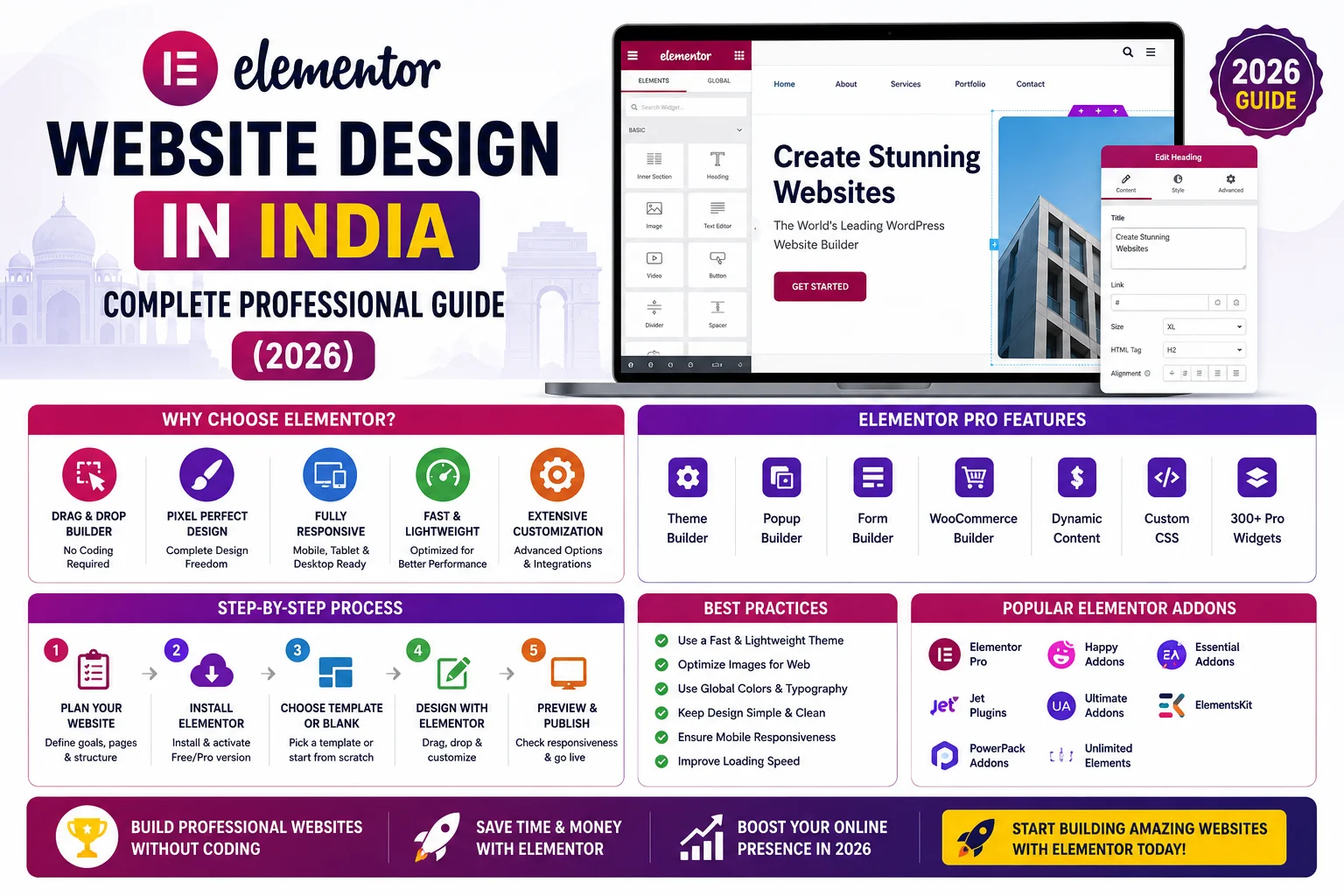
Elementor has transformed how professional websites are built in India.
What once required weeks of custom coding can now be designed visually —
with pixel-perfect control, real-time preview, and professional results that were previously
only achievable by experienced developers.
But Elementor is only as powerful as the person using it.
Used correctly, it produces fast, beautiful, lead-generating websites.
Used incorrectly, it produces slow, bloated websites that rank poorly on Google and frustrate visitors.
This complete guide teaches you everything about Elementor website design in India in 2026 —
from setup and design best practices to speed optimization and WooCommerce integration.
What is Elementor and Why is it Popular in India?
Elementor is a visual drag-and-drop page builder plugin for WordPress —
the most popular page builder in the world with over 12 million active installations globally.
In India, it has become the tool of choice for freelance developers, agencies, and business owners
who want professional results without starting from scratch with custom code.
- Visual editor — design what you see, live, in real time
- No coding required for most design tasks — accessible to non-developers
- 100+ free widgets — headings, images, buttons, forms, sliders, tabs, testimonials, and more
- 300+ professionally designed templates — starting points for any type of page
- Full mobile responsiveness controls — design specifically for mobile, tablet, and desktop
- WooCommerce integration (Pro) — design product pages, cart, and checkout visually
- Popup builder (Pro) — create lead capture popups without extra plugins
Elementor Free vs Elementor Pro — Which Do You Need?
Elementor has a free version and a Pro version. Understanding the difference helps you
decide what your specific Indian business website actually needs.
Elementor Free — What’s Included
- 40+ basic widgets — heading, image, button, video, Google Maps, social icons
- Basic page building for content pages and blog posts
- Mobile responsiveness controls
- Revision history — undo and restore previous versions
- Sufficient for: Simple portfolio sites, basic business pages, blog layouts
Elementor Pro — What’s Added
- 90+ Pro widgets — Flip Box, Price Table, Countdown, Lottie Animation, Custom Code, and more
- Theme Builder — design your entire site including header, footer, archive pages, and single post templates
- WooCommerce Builder — design product pages, shop pages, cart, and checkout with full visual control
- Popup Builder — design and trigger popups for lead capture, promotions, and announcements
- Form Builder — advanced forms with email marketing integrations (Mailchimp, HubSpot)
- Dynamic content — display custom fields, user data, and post information dynamically
- Motion effects — scroll animations, mouse effects, parallax
- Cost in India: ₹4,500/year for single site — ₹8,500/year for 3 sites
For professional Indian business websites — Elementor Pro is almost always worth the investment.
The Theme Builder alone (header, footer, blog templates) makes Pro essential for any complete website.
How to Set Up Elementor Correctly for Indian Business Websites
Step 1: Choose the Right Theme to Use With Elementor
Elementor works with any WordPress theme — but choosing a lightweight, Elementor-compatible theme
is critical for speed and design flexibility.
- Hello Elementor (free): Official Elementor theme — ultra-lightweight, minimal styling. Best for maximum design control through Elementor alone.
- Astra (free/Pro): Most popular Elementor companion theme — fast, flexible, excellent default styling.
- GeneratePress (free/Pro): Fastest theme available — best for PageSpeed score priority.
- Avoid heavy multipurpose themes like Avada or Jupiter — they conflict with Elementor and slow your site significantly.
Step 2: Configure Elementor Settings Correctly
- Go to Elementor → Settings → Style → set your global colors and typography before building any page
- Set Global Colors: Primary, Secondary, Text, Accent — ensures consistent branding across all pages
- Set Global Fonts: Heading font and body font — consistency is essential for professional design
- Enable Improved Asset Loading (Elementor → Settings → Advanced) — loads Elementor CSS only on pages that use it
- Enable Inline Font Icons — reduces HTTP requests and improves speed
Step 3: Understand Elementor’s Structure
Every Elementor page is built in a three-level hierarchy. Understanding this is fundamental to efficient building:
- Sections: The full-width containers that stack vertically down the page — your hero section, services section, testimonials section
- Columns: Divide sections horizontally — a 2-column layout, 3-column service cards, 4-column team grid
- Widgets: The content elements placed inside columns — headings, images, buttons, forms, icons
Elementor Website Design Best Practices for India
1. Design Mobile-First — 78% of Indian Traffic is Mobile
India is overwhelmingly mobile — 78% of all internet users browse on smartphones.
Every Elementor design decision must consider mobile experience first.
- Use Elementor’s responsive controls to adjust font sizes, spacing, and layouts for mobile specifically
- Test every section on mobile preview within Elementor before publishing
- Make CTA buttons large enough to tap comfortably — minimum 44px height
- Ensure phone numbers are click-to-call on mobile
- Check that contact forms work correctly on mobile keyboards — especially for Indian users on Android
2. Use Global Widgets for Consistent CTAs
If your “Get a Quote” button appears on 20 pages — update a Global Widget and it updates everywhere instantly.
Save your most-used elements as Global Widgets to maintain consistency and save rebuilding time.
- Save your CTA section as a Global Widget — used on multiple pages
- Save your header WhatsApp banner as Global
- Save your contact form section as Global
- Right-click any widget → Save as Global → name it clearly
3. Use Template Parts and Saved Sections
- Save frequently used sections — testimonials block, FAQ section, team cards — for reuse across pages
- Use My Templates to maintain a library of your best sections for new projects
- Import and export templates between projects — saves hours of rebuilding common sections
4. Typography and Color Standards for Indian Business Websites
- Heading font: Modern, professional — Inter, Poppins, or Nunito work excellently for Indian business sites
- Body font: Highly readable — Open Sans, Lato, or Roboto — minimum 16px for body text
- Contrast: Ensure sufficient contrast between text and background — critical for readability on low-brightness mobile screens
- Color palette: Maximum 3 brand colors — primary, secondary, and accent. More colors = unprofessional.
- Consistency: Every page uses identical colors and fonts — set these in Global Settings, never override manually
Elementor Speed Optimization — Critical for Indian Websites
Elementor’s biggest criticism is that it can make WordPress websites slow.
This happens when Elementor is used incorrectly — not because of Elementor itself.
A properly optimized Elementor website achieves 90+ PageSpeed scores on mobile.
Common Elementor Speed Issues and Fixes
- Too many sections with heavy animations: Limit entrance animations — use them for 2 to 3 key sections maximum, not every element
- Large uncompressed images: All images must be compressed to WebP format before uploading — use Imagify plugin
- Loading Elementor CSS on all pages: Enable “Improved Asset Loading” in Elementor Advanced settings — loads CSS only where Elementor is actually used
- Google Fonts loading from external servers: Enable “Load Google Fonts Locally” in Elementor settings — reduces DNS lookups
- No caching plugin: Always use WP Rocket or LiteSpeed Cache alongside Elementor — caching is essential for acceptable speed
- Heavy multipurpose theme: Switch to Hello Elementor or Astra — lightweight themes eliminate theme-Elementor conflicts
Elementor Speed Optimization Checklist
- Enable Improved Asset Loading in Elementor → Settings → Advanced
- Enable Inline Font Icons in same settings
- Load Google Fonts locally — in Elementor settings
- Install WP Rocket or LiteSpeed Cache and configure correctly
- Compress all images to WebP with Imagify
- Use Hello Elementor or Astra as your base theme
- Enable Cloudflare CDN — free plan covers India excellently
- Minimize animations — beautiful but expensive in loading time
- Target: 90+ mobile PageSpeed score — test at pagespeed.web.dev
Elementor for WooCommerce — Building Indian Online Stores
Elementor Pro’s WooCommerce Builder allows complete visual design of your online store —
shop page, product pages, cart, checkout, and order confirmation — without touching any code.
- Design product pages that highlight key product features, size guides, and customer reviews
- Custom Add to Cart buttons with brand styling — not WordPress default grey buttons
- Product gallery design — large images, zoom functionality, multiple angle views
- Trust badges on checkout page — secure payment, easy returns, fast delivery
- WhatsApp order inquiry button on product pages — popular with Indian customers before first purchase
- Mobile-optimized checkout — simplified for single-thumb mobile usage
Elementor SEO — Making Sure Your Site Gets Found on Google
Elementor does not negatively affect SEO when used correctly.
Follow these practices to ensure your Elementor website ranks well:
- Use Elementor’s Heading widget with the correct HTML tag — H1 for page title, H2 for sections, H3 for subsections
- Set image alt text for every image in Elementor — either in the widget settings or WordPress media library
- Install Rank Math SEO alongside Elementor — handles all meta titles, descriptions, and schema
- Avoid placing important text inside background images — Google cannot read text embedded in images
- Use Elementor’s Spacer widget instead of empty paragraphs for vertical spacing — keeps HTML clean
- Enable CSS Print Method: External File in Elementor → Settings → Advanced — improves rendering speed
Common Elementor Design Mistakes Indian Businesses Make
- Using too many different fonts — professional Elementor design uses maximum 2 fonts consistently
- Overusing animations on every element — excessive motion is distracting and slows the page significantly
- Not setting Elementor Global Colors before building — manually setting colors on each element makes updates a nightmare
- Ignoring mobile design — designing only on desktop and assuming mobile will look fine automatically
- Using raster images (PNG/JPG) instead of SVG for logos and icons — SVG scales perfectly and loads faster
- Not using sections for logical content groupings — random element placement creates inconsistent spacing
- Building directly on the live site — always use a staging environment for major design changes
Pros and Cons of Elementor for Indian Business Websites
Pros
- Visual design without coding — accessible to designers and non-developers alike
- Real-time preview — see exactly how the page looks as you build it
- Responsive design controls — fine-tune mobile and tablet separately
- Massive template library — professional starting points for any page type
- WooCommerce integration — complete store design without developer dependency
- Popup builder — lead capture without extra plugins
Cons
- Can slow websites if not properly optimized — requires speed setup knowledge
- Annual Pro cost — ₹4,500/year per site
- Heavy animation use causes poor Core Web Vitals — must be used conservatively
- Not ideal for very complex custom functionality — custom PHP development still needed
Conclusion
Elementor is one of the most powerful tools available for building professional Indian business websites in 2026.
When set up correctly — with the right theme, proper speed configuration, global styles, and mobile-first design —
it delivers pixel-perfect, fast, SEO-friendly websites that generate real leads for Indian businesses.
The key is using Elementor correctly from the start.
Set global colors and fonts before building. Optimize for mobile at every step.
Configure speed settings properly. And always prioritize user experience over visual complexity.
Call To Action
Need a professional Elementor website built by an experienced developer?
Get a free project consultation today — we design and develop fast, SEO-optimized Elementor websites for Indian businesses.
Or contact us on WhatsApp to discuss your website design requirements.
Frequently Asked Questions
Is Elementor good for Indian business websites in 2026?
Yes — Elementor is excellent for Indian business websites when used correctly.
It delivers professional, mobile-responsive designs with visual control and fast build times.
The key is proper speed optimization setup — correct theme selection, caching, and image compression —
to ensure the site loads fast for Indian mobile users.
How much does it cost to build a website with Elementor Pro in India?
Elementor Pro costs ₹4,500 per year for a single site license.
A professional Indian business website built with Elementor Pro typically costs ₹20,000 to ₹60,000 total —
including design, development, SEO setup, and speed optimization by an experienced WordPress developer.
Does Elementor slow down WordPress websites?
Elementor can slow WordPress sites if used incorrectly — too many animations, uncompressed images,
or a heavy base theme. When properly optimized — with Hello Elementor or Astra as the theme,
WP Rocket for caching, Imagify for images, and Elementor’s Improved Asset Loading enabled —
Elementor websites regularly achieve 90+ PageSpeed scores on mobile.
Do I need Elementor Pro or is the free version enough?
For a complete professional Indian business website, Elementor Pro is strongly recommended.
The Theme Builder (custom header, footer, blog templates) and WooCommerce Builder
are essential for any website that goes beyond basic content pages.
The free version is sufficient only for very simple portfolio or blog sites.
Can Elementor websites rank well on Google?
Yes — Elementor websites rank excellently on Google when SEO is set up correctly alongside them.
Install Rank Math SEO, use proper heading structure in Elementor widgets, compress all images,
achieve 90+ mobile PageSpeed score, and submit your sitemap to Google Search Console.
Elementor itself has no negative impact on SEO rankings.
What is the best theme to use with Elementor in India?
Hello Elementor (free — made by the Elementor team) is the best choice for maximum design control and speed.
Astra (free or Pro) is the most popular alternative — fast, flexible, and with excellent Elementor compatibility.
Both consistently achieve 90+ PageSpeed scores when paired with proper caching and image optimization.